🏬Supersize Online Funeral Retailer🪦1000's of Headstones⚱️Over 10,000 Cremation Urns⚰️Caskets Overnight Delivery🛒Funeral & Memorial Superstore🚚FREE Shipping on ALL Orders👨👩👧👦Helping Families for over 20 Years💰Lowest Price Guarantee🏬Supersize Online Funeral Retailer🪦1000's of Headstones⚱️Over 10,000 Cremation Urns⚰️Caskets Overnight Delivery🛒Funeral & Memorial Superstore🚚FREE Shipping on ALL Orders👨👩👧👦Helping Families for over 20 Years💰Lowest Price Guarantee
🏬Supersize Online Funeral Retailer🪦1000's of Headstones⚱️Over 10,000 Cremation Urns⚰️Caskets Overnight Delivery🛒Funeral & Memorial Superstore🚚FREE Shipping on ALL Orders👨👩👧👦Helping Families for over 20 Years💰Lowest Price Guarantee🏬Supersize Online Funeral Retailer🪦1000's of Headstones⚱️Over 10,000 Cremation Urns⚰️Caskets Overnight Delivery🛒Funeral & Memorial Superstore🚚FREE Shipping on ALL Orders👨👩👧👦Helping Families for over 20 Years💰Lowest Price Guarantee
Learning how to memorialize an Instagram account is usually prompted by something specific and unbearable: a birthday notification, or the account appearing in somebody's suggested follows months after the funeral.
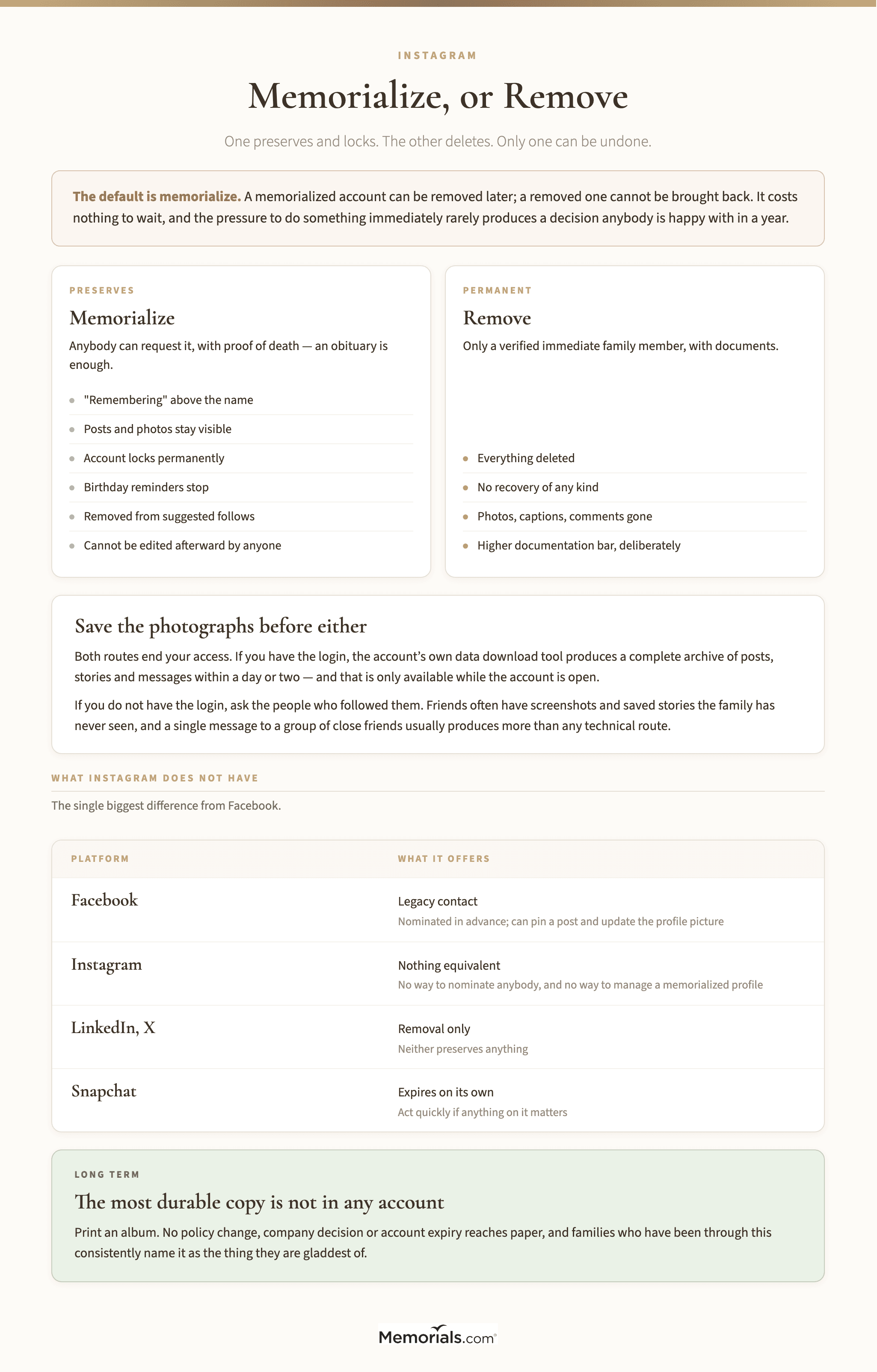
Memorializing stops that. It leaves the posts and the photographs exactly where they are, and it locks the account so nobody can log into it — including you. It is the middle option between deleting everything and leaving it live.
The word "Remembering" appears above the profile name. This is the visible signal, and it is what most people mean by an Instagram memorial — the profile is unchanged otherwise. Searches for remembering Instagram profiles, or for an Instagram dead account, generally land on this one feature under several names.
The account is locked permanently. Nobody can log in, including anybody who has the password. Posts, photos, videos and comments stay exactly as they were and remain visible to whoever could see them before.
It stops appearing in public spaces. Memorialized Instagram accounts are excluded from suggested follows, from the explore surface and from the places an algorithm decides to put a familiar face. This is the change that matters most day to day.
Birthday reminders stop, along with the prompts to reconnect. On the linked Facebook profile, the same applies.
What does not change: the content stays exactly as it is. Nothing is deleted, nothing is hidden, and existing followers keep their access. Nobody gains new ability to post, reply or edit.
One caveat worth knowing. A memorialized account cannot be changed afterward by anybody. If there is a post the family would want removed, or a profile picture nobody likes, deal with it before requesting memorialization rather than after — because after is not an option.
"Remembering" above the name, and the birthday reminders stop. Everything already posted stays exactly where it is.
Memorialize or Remove?
Two different requests with two different outcomes, and the difference is permanent.
Memorializing preserves everything and locks it. Anyone who could see the account still can. It is reversible only in the sense that a removal request can follow later.
Removal deletes the account and everything in it. Photos, captions, comments, messages — gone, with no recovery. Only a verified immediate family member can request this.
The case for memorializing first. It costs nothing to wait, and the pressure to do something immediately rarely produces a decision anybody is happy with in a year. A memorialized account can be removed later; a removed one cannot be brought back.
The case for removal is narrower and real: an account being targeted by strangers, an account that had already been compromised, or a family for whom the profile's continued existence is genuinely painful rather than comforting. All three are legitimate and none of them needs justifying to anybody.
Talk to the people who follow it. A dead Instagram account is often where a wider circle of friends has been leaving messages, and they may not have any other place to do that. Families who remove an account quickly sometimes find they have closed something that mattered to twenty people they had never met.
Memorializing can be undone by removing later. Removal cannot be undone at all.
How to Request It
Memorialization is requested through a form rather than from inside the app, and anybody can submit it — you do not need to be family.
What you need for a memorialization request: a link to the profile, and proof of death. An obituary or a news article is accepted, which surprises people; it does not have to be a death certificate.
What you need for a removal request: proof that you are an immediate family member — a birth certificate, a death certificate, or documentation showing you are the legal representative — as well as proof of death. This is a substantially higher bar, deliberately.
Where.Instagram's help center carries both forms, and the same request also covers the linked Facebook profile in most cases, though it is worth submitting separately if the accounts were not connected.
How long. Usually days rather than weeks. If nothing has happened after a couple of weeks, submit again — these queues are automated enough that a request can simply be lost, and there is no penalty for a duplicate.
Do not log into the account to "handle it" first. It breaches the terms of service, and a login from an unfamiliar device on an account that has been reported can lock things in ways that make the legitimate request harder.
The Notifications, Which Are the Real Problem
Almost everybody arriving at this page is here because of a notification, so it is worth being specific about which ones stop and when.
Birthday reminders. These stop on memorialization, and they are the ones that cause the most distress — an alert on a phone, months later, on a morning nobody was braced for.
Suggested follows and "people you may know". The profile stops being offered to others. It will not appear to a colleague who never heard, which spares a conversation nobody wants to have twice.
Anniversary and memory features. Instagram and Facebook both resurface old content. Memorialization limits this, though a friend's own memories may still include photographs of the person, which is a separate thing and not something the family can switch off.
Tagged photos stay tagged. Other people's posts are their own, and they keep the tag. Some families find that comforting and some find it hard, and there is no setting either way.
It takes a few days to propagate. A notification arriving the day after memorialization is not a failure — the systems catch up over about a week.
The birthday reminder is what brings most people here. It stops, though it takes about a week to settle.
Facebook, and Why It Is Different
Instagram and Facebook are the same company and the processes are similar, but Facebook has one thing Instagram does not: a legacy contact.
A Facebook legacy contact is nominated in advance by the account holder and can, after memorialization, write a pinned post, respond to new friend requests, and update the profile picture. They cannot read messages or log in as the person.
Instagram has no equivalent. There is no way to nominate anybody, and no way for a family member to manage a memorialized profile afterward. This is the single biggest practical difference between the two and it is why the Instagram decision is more final than the Facebook one.
The same advance-nomination logic applies to Apple's legacy contact and Google's Inactive Account Manager, both of which are worth setting up on your own accounts while you are thinking about it.
The Other Platforms, Briefly
If you are dealing with one account you are usually dealing with several, and they do not work alike. What each allows:
Platform
Memorialize?
Who can request removal
Nominate in advance?
Instagram
Yes — "Remembering"
Immediate family, with documents
No
Facebook
Yes, with a legacy contact who can manage it
Immediate family
Yes
X
No memorial state
Immediate family or estate representative
No
LinkedIn
No — profile is removed or left
Anyone, with a form
No
TikTok
No formal process
Case by case, via support
No
Snapchat
No — accounts expire on inactivity
Delete on request
No
Pinterest
No
Family, with documents
No
YouTube
Via the Google account
Google's inactive account process
Yes, via Google
The pattern: the two that let somebody plan ahead are the two run by companies that also run an operating system, and everywhere else the family is left submitting forms and hoping. That is worth knowing when you decide where to keep the photographs that matter.
LinkedIn is the one families forget, and it is the one most likely to reach former colleagues who never heard. A profile left live keeps appearing in professional searches for years, and removal is a single form that anybody can submit.
Snapchat is the one to act on quickly if there is anything worth saving, because inactive accounts expire on their own and the content goes with them. Nothing needs to be requested for that to happen.
Saving the Photographs First
If the account holds photographs that exist nowhere else — and for a lot of people it does — get them out before you request anything, because both routes end your access.
If you have the login, the account's own data download tool produces a complete archive of posts, stories, messages and comments. It arrives by email within a day or two. This is by far the easiest route and it is only available while the account is open.
If you do not have the login, you are limited to what is publicly visible. Saving individual posts by hand from a browser works and is slow, and it captures the image at display resolution rather than the original.
Ask the people who followed them. Friends often have screenshots, saved stories and messages the family has never seen. A single message to a group of close friends usually produces more than any technical route.
Do this first. Not after, and not "when things settle down". Memorialization locks the account, removal deletes it, and neither is undoable.
The most durable copy is not in any account. No policy change reaches a printed album.
The request is a form, not a setting. Anyone can ask for memorialization; only family can ask for removal.
When Strangers Find the Account
Worth preparing for, because it happens more often than families expect and it is distressing when it does.
Comment sections attract people who never knew them. A public account, especially after a death that was reported anywhere, draws condolences from strangers, and occasionally worse. Memorialization does not close comments — it locks the login, not the conversation.
What you can do. Existing followers keep commenting either way. If the account was public and the attention is unwelcome, removal is the only complete answer, which is one of the few cases where acting quickly is justified.
Impersonation accounts appear. Someone copies the profile picture and the name and starts a new account, sometimes to solicit donations. Report it as impersonation rather than as spam — it is a different category and it gets handled faster. Memorializing the real account helps, because it makes the fake one easier to distinguish.
So do the messages offering to recover money. A public death and a named family are all a finder service needs. The rule is the one in unclaimed money from deceased relatives: the state holds it, the search is free, and anybody asking for a percentage to tell you it exists is selling you a public database.
Tell the family before they find it. Someone always searches the name at two in the morning. Better they hear about a fake profile from a relative than discover it alone.
What to Do With the Account Long Term
There is no deadline, and that is worth saying because everything else in an estate has one.
Leave it. A memorialized account costs nothing, holds its place, and remains somewhere friends return to on an anniversary. Many families never do anything further, and that is a complete answer rather than an unfinished task.
Or download and remove, later. If the account is going to be removed, doing it a year out means the decision is made by people who are no longer in the first weeks of grief. The archive can be saved first — but only if somebody still has the login, which is the argument for downloading now regardless of what you decide later.
Print something. The most durable version of a photograph is not in any account. Families who have been through this often say the thing they are gladdest of is the one album they had printed, which no policy change or company decision can reach.
Frequently Asked Questions
Is there a memorialized Instagram accounts list anywhere? No, and there is no public directory of them. Memorialized profiles look almost identical to ordinary ones apart from the "Remembering" line, and there is no way to browse them.
Can I still comment on their posts? Yes, if you could before. Existing followers keep the access they had.
Someone is posting from an Instagram deceased account. Then it has been compromised, or somebody has the password and is using it. Report it and request memorialization urgently — locking the account is exactly what stops this.
Can a memorialized account be reversed? Not back to an ordinary account, no. It can be removed entirely by an immediate family member, which is the only remaining option.
What about their private messages? Not accessible to anybody through any process, memorialized or not. This is consistent across every major platform and it is not negotiable.
Does memorializing affect their follower count or the people they followed? No. Both stay as they were, and people can still follow the memorialized profile if it was public.
Nobody knows the password and there is no proof of death yet. The memorialization request needs proof of death, and an obituary is enough. Until then nothing can move.
In Closing
The default is memorialize, and the reason is simply that it can be undone in one direction and not the other. Save the photographs, request the memorialization, and leave the harder decision for a year from now when it will be an easier one to make.
The notifications stopping is the point. Everything else on the profile can wait.